

Artificial intelligence is rapidly becoming a standard part of everyday business operations. Among the most talked-about AI tools for business today is Microsoft Copilot. However, with a monthly subscription cost per user, many small business owners are understandably asking: is it actually worth the investment?
This article is a practical guide to help you decide. We will explore real use cases, the genuine benefits, the limitations, and the setup considerations you need to know before rolling it out to your team.
What Is Microsoft Copilot?
In simple terms, Microsoft Copilot is an intelligent assistant built directly into your everyday Microsoft 365 applications. It works seamlessly inside Word, Excel, Outlook, Teams, and PowerPoint.
Rather than being a separate app you have to log into, Copilot sits inside the tools you already use. It helps users create content, summarize information, organize0 files, analyze data, and automate repetitive tasks using natural language prompts.
Why Small Businesses Are Interested in Copilot
Small businesses and SMEs often operate with limited staff and tight budgets. Common daily challenges include:
- Too many admin tasks taking up valuable time.
- Long, complex email threads that are hard to follow.
- Taking accurate meeting notes while trying to participate.
- Creating reports, proposals, and policies from scratch.
- Making sense of complex spreadsheets.
- Keeping up with customer communication under time pressure.
Because of these pressures, Microsoft Copilot for small businesses is highly appealing. It promises to handle the heavy lifting of daily admin, freeing up staff to focus on growth and customer service.
Real Use Cases That Save Time
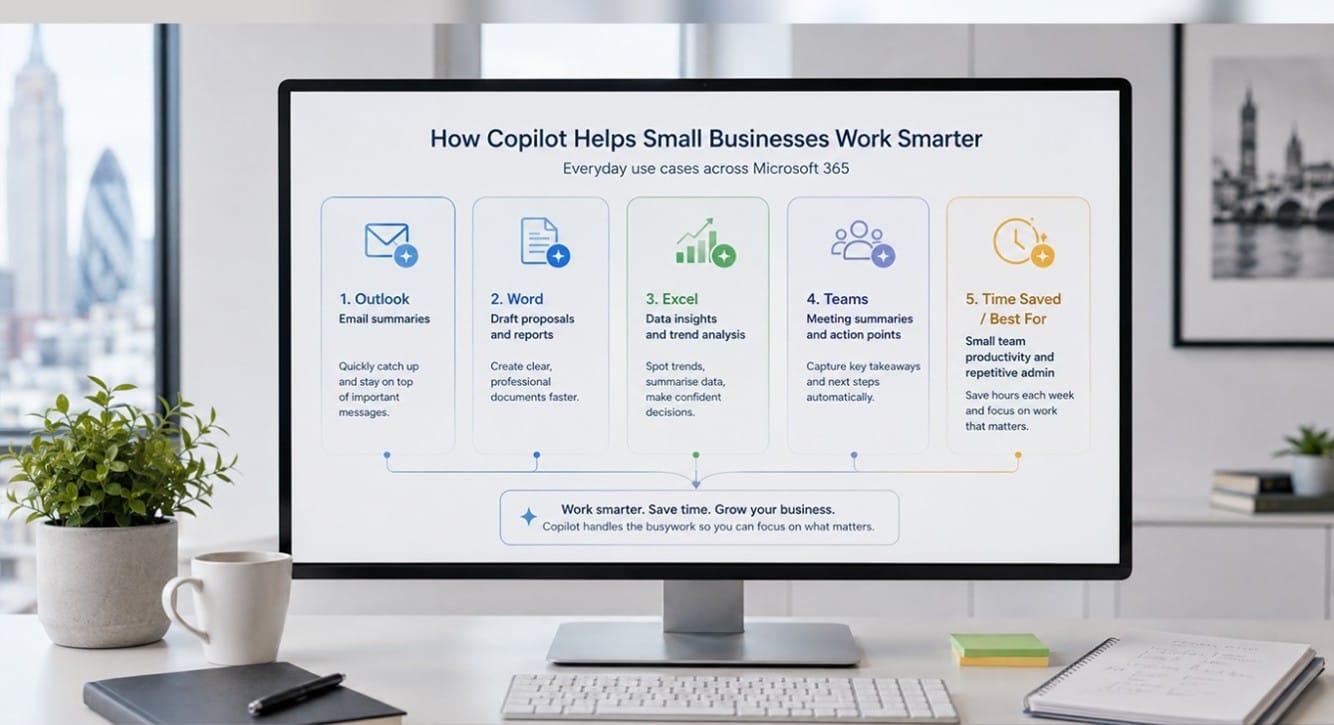
To understand the value of these business productivity tools, it helps to look at how they work in practice. Here are real use cases where Copilot saves time.
a. Summarising long email threads in Outlook
If you join a project halfway through, catching up on a 50-email thread can take an hour. Copilot can instantly summarise the conversation, highlight key decisions, and even draft a reply based on your instructions.
b. Writing first drafts in Word
Staring at a blank page is a common hurdle. Copilot can generate first drafts for proposals, internal policies, client letters, and reports. You simply provide a brief outline or reference an existing document, and it creates a structured draft for you to edit.
c. Analysing spreadsheets in Excel
You do not need to be a data expert to find insights. Copilot can analyse your spreadsheets, identify trends, suggest formulas, and summarise data in plain English. This supports faster, more informed decision-making.
d. Creating meeting summaries in Teams
For teams that hold frequent calls, Copilot can listen in and generate a summary of the discussion. It automatically pulls out action points, notes who is responsible for them, and highlights follow-up tasks.
e. Building presentations in PowerPoint
You can turn a Word document or a set of bullet points into a fully formatted presentation draft. Copilot suggests layouts, adds relevant imagery, and structures the slides, saving hours of formatting time.
f. Reducing repetitive admin work
Copilot can support routine tasks like formatting documents or organising files. However, it is important to remember that it supports these tasks rather than replacing the need for human review and oversight.
Is Microsoft Copilot Worth the Cost?
The answer depends entirely on how your team currently works.
Copilot is most useful for businesses that already use Microsoft 365 heavily. If your staff spend hours every day managing emails, attending meetings, writing documents, and analysing reports, the time saved will quickly justify the cost.
Conversely, if your business has very basic IT needs, or your team rarely uses the deeper features of Microsoft 365, Copilot may not be necessary. It is an investment that pays off through active, daily use.
What Are the Limitations?
It is important to have realistic expectations. Copilot is a powerful tool, but it is not perfect.
- Outputs need checking: Copilot can occasionally produce inaccurate information. Staff must always review its work.
- Staff need training: Users need to know how to write good prompts to get the best results.
- Data security settings must be reviewed: If your permissions are too open, Copilot might surface sensitive information to the wrong staff members.
- Not every process needs it: For simple tasks, using Copilot might actually take longer than just doing it manually.
- Poorly organised environments reduce its value: If your files and emails are a mess, Copilot will struggle to find the right information to help you.
- Permissions matter: Copilot can only access and summarise data that the specific user already has permission to see.
Why Setup and Support Matter
You should never simply turn Copilot on without reviewing your underlying Microsoft 365 settings. A proper Microsoft Copilot setup requires careful planning.
Before deployment, you need to review:
- User permissions and access controls.
- SharePoint and OneDrive folder structures.
- Email security and data access rules.
- Staff training requirements.
- Device security and backup compliance.
If your Microsoft 365 environment is poorly organised, Copilot will amplify those issues. This is where expert Microsoft 365 consultancy becomes essential. At Focus PC, we help businesses assess whether Copilot truly fits their workflow, ensuring the underlying IT environment is secure and structured correctly before introducing new tools.
How Focus PC Can Help
Implementing new technology should be a smooth, stress-free process. As a provider of IT support for small businesses, we ensure your technology works for you, not against you.
Focus PC can help your business with:
- Microsoft 365 setup and optimisation: Ensuring your environment is structured for success.
- Copilot readiness checks: Reviewing your permissions and data security before you switch it on.
- Cloud and remote working support: Keeping your team connected and productive anywhere.
- Cybersecurity reviews: Protecting your business data from modern threats.
- Staff guidance: Helping your team understand how to use their tools effectively.
- Managed IT support: For businesses seeking reliable, managed IT support, London companies trust Focus PC to keep their systems running smoothly.
For expert Microsoft 365 support, London businesses rely on our practical, jargon-free approach to technology.
Conclusion
Microsoft Copilot can be highly worth the cost for small businesses when used correctly. The real value comes from saving time on admin, improving daily workflows, and ensuring the tool is set up securely. However, it requires a well-organised IT environment and a team that knows how to use it.
If your business is considering Microsoft Copilot or wants to get more from Microsoft 365, Focus PC can help. Contact Focus PC for practical Microsoft 365 support, cloud setup, and small business IT support in London.